
Internet
Setup Information
Netscape 4.0x
Mail and News
Netscape Mail and News
(For Windows 95, Windows 98, and Macintosh)
Open the Netscape Navigator program. Click Edit,
and click Preferences. In the Preferences dialog box, double-click Mail & Groups.
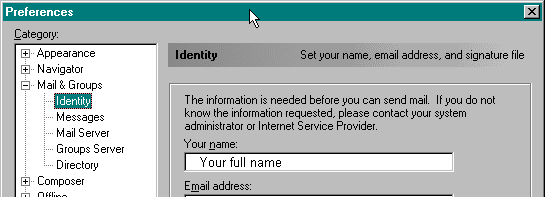
Double-click Identity
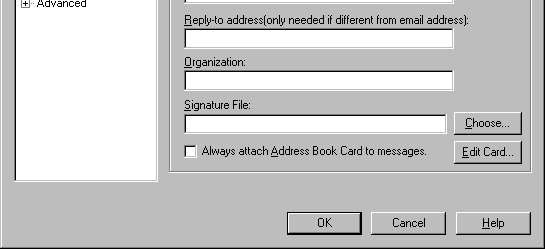
Use the picture below as a guideline when filling in the appropriate information in the Identity
section.
 |
|
|
|
 |
|
||
 |
 |
|
|
 |
|
||
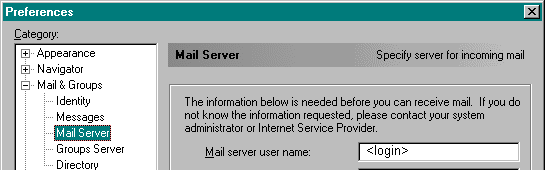
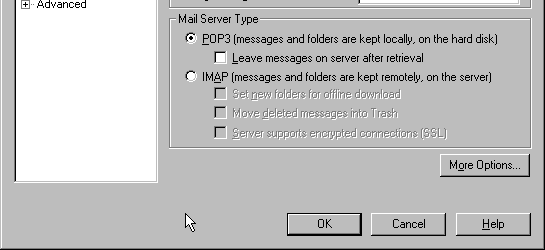
When you have finished, click the Mail Servers category and fill in the appropriate information.
 |
|
|
|
|
 |
|
|||
 |
 |
|
||
 |
|
|||
 |
 |
|
||
 |
|
|||
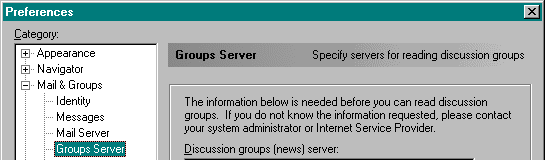
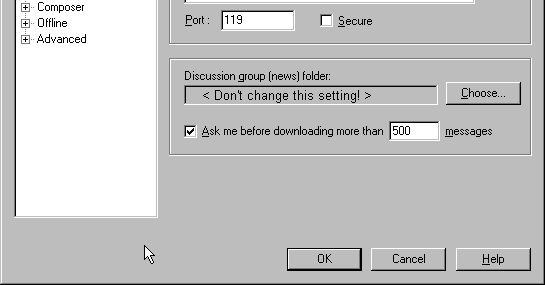
When you have finished, click the Groups Server category and fill in the appropriate information.
 |
|
|
|
 |
|
||
 |
 |
|
|
 |
|
||
MORE INFORMATION